As Salesforce professionals we are rarely short on tasks. What we are short on is uninterrupted thinking time.
Between discovery calls, internal syncs, documentation, build work, and support requests, it is easy for even strong teams to feel reactive rather than intentional. The systems we build are meant to create efficiency, yet the way we deliver them often works against us.
This is where AI, used correctly, has started to make a real difference.
Rather than chasing trends or novelty tools, many Salesforce professionals are quietly assembling a small set of AI-powered tools that reduce friction across their daily workflow. These tools help capture requirements more accurately, speed up design and build decisions, and preserve context that is normally lost between meetings.
This article walks through a practical AI toolkit for Salesforce professionals in 2026, based on what Admins, Consultants, Developers, and Architects are actually using today.
The Top AI Tools for Salesforce Professionals in 2026
Each tool in this list has been validated through real-world use by Salesforce professionals. They are recommended because they improve delivery and decision-making, not because they make for impressive demos or quick clips that look cool.
Here’s a quick rundown of the top AI Stack for Salesforce Pros:
- NotebookLM – NotebookLM is a tool by Google that helps Salesforce professionals summarize, cross-reference, and reason over documentation, requirements, and source materials using AI – the amazing thing is that its feedback is grounded in the materials you feed it not random internet content.
- ChatGPT – Used as an on-demand thinking partner, ChatGPT helps Salesforce professionals work through solution approaches, design automation, troubleshoot issues, produce clear documentation, and convert business needs into executable Salesforce logic.
- Loom – Loom enables Salesforce professionals to explain and document work through short async videos, with AI handling summaries and follow-ups, making it easier to share changes and context without adding more meetings to the calendar.
- Fireflies.ai – Fireflies captures conversations automatically by recording and summarizing meetings, giving Salesforce teams a reliable record of requirements, decisions, and next steps without relying on handwritten notes.
- Claude Code – Built for technical work, Claude Code supports Salesforce developers by helping them navigate, understand, and improve codebases, making it especially valuable for Apex development, integrations, and complex automation logic.
Let’s now explore each of these tools in detail.
1. NotebookLM
NotebookLM functions as a research and synthesis workspace where AI responses are grounded in your own uploaded materials. Instead of starting from a blank prompt, you are working from discovery notes, transcripts, specifications, and reference documents.
This makes it especially useful in Salesforce environments where accuracy and traceability matter.
“Notebook LM is my very favorite! I make a notebook for every project. It’s my thought partner and helps with discovery planning and prepping for sessions, writing user stories and acceptance criteria, evaluating user stories, creating documentation from training transcripts, and more. It’s employer- approved because it’s part of our Google subscription (powered by Gemini) – and unlike with ChatGPT, we are allowed to feed it client documents. I’m hoping to lead a session at Nonprofit Dreamin about it!” – Becca Davis | Senior Salesforce Consultant
Why NotebookLM Stands Out
- Summarizing discovery call transcripts into actionable requirements
- Comparing multiple documents to identify gaps or conflicts
- Creating user stories and acceptance criteria from raw notes
- Reviewing Salesforce release information in context
- Converting certification study notes into audio-style learning
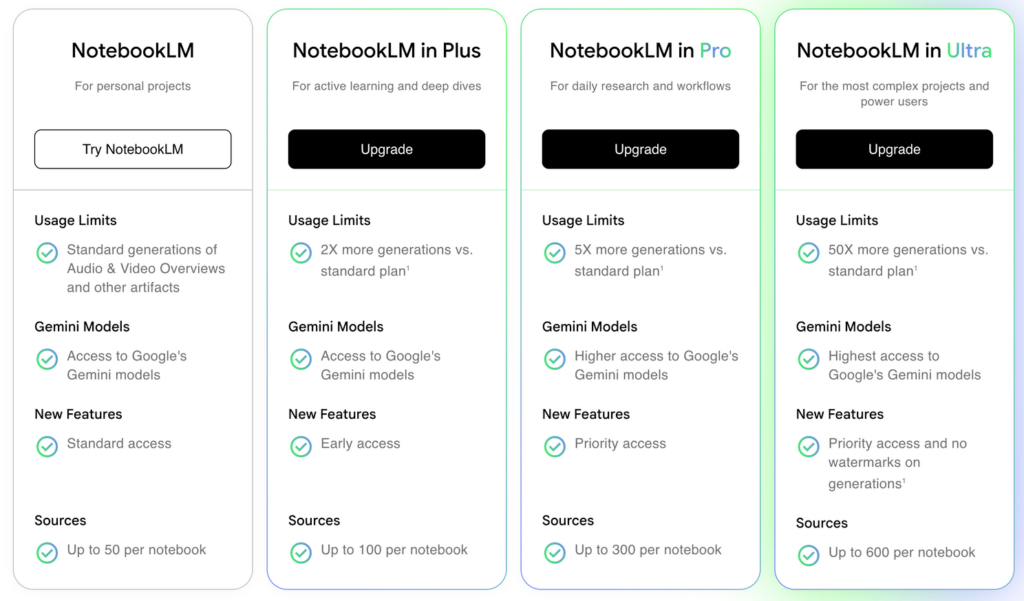
Pricing for NotebookLM
2. ChatGPT
ChatGPT is best thought of as a flexible reasoning partner rather than a single-purpose tool. Salesforce professionals use it to think through design decisions, debug logic, draft documentation, and pressure-test ideas before implementation.
It is not tied to a specific org, which makes it useful across multiple clients and environments.
Who Typically Uses ChatGPT?
ChatGPT is used daily by Salesforce Admins, Consultants, Developers, Architects, and Technical Leads who want to move faster, reduce manual effort, and improve the quality and consistency of their work.
Recently went through the TS Experience Project and ChatGPT was so helpful for troubleshooting Salesforce Flows, or even just getting me started on how to conceptualize a solution. 10/10 saved me so much time. – Natalie Iraola, MBA | Salesforce Administrator
Common Use Cases
- Designing flow logic and automation patterns
- Translating business language into technical approaches
- Drafting validation rules, formulas, and pseudo-code
- Troubleshooting issues before jumping into an org
- Creating consistent documentation and explanations
Because it supports both declarative and programmatic work, ChatGPT is used across nearly every Salesforce role.
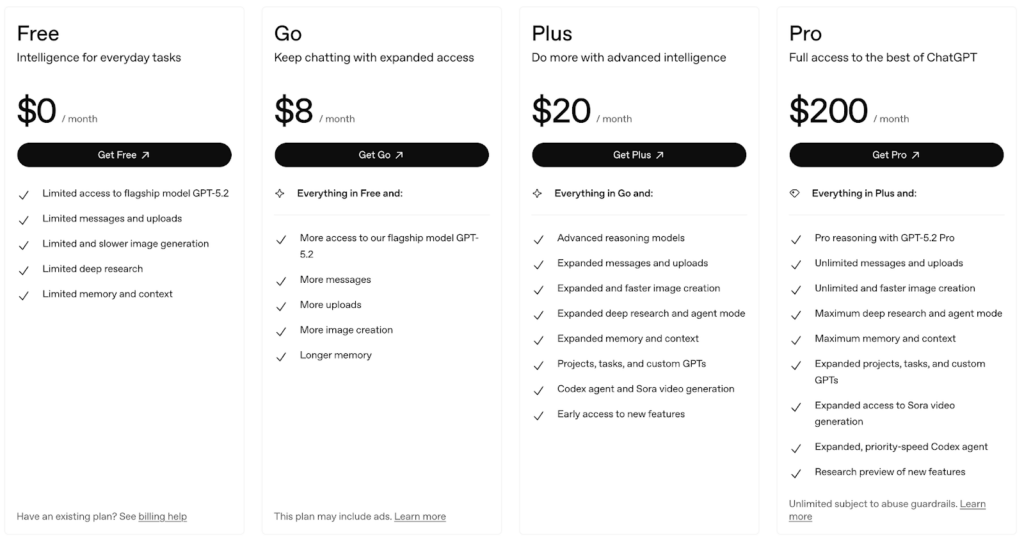
Pricing for ChatGPT
3. Loom
Salesforce work is visual by nature. Explaining a flow, a permission change, or a new automation is often far easier to show than to describe.
Loom allows Salesforce professionals to record short walkthroughs while AI automatically generates summaries and action items. This reduces the need for live meetings while improving clarity.
Who Typically Uses Loom?
Loom is commonly used by Salesforce Admins, Consultants, Developers, and Architects who need to explain changes, document processes, or provide handoffs to stakeholders and teammates without constantly scheduling meetings.
“Loom has been one of my most heavily used tools over the past few years. I use it almost daily to demo/showcase Salesforce functionality, enable clients with new processes and/or custom features (think change management), and I’ve used it often to build internal assets (e.g. SOPs, KT) and for my own demo rehearsal. The editing and stitching functionality is solid and makes it easy to polish walkthroughs. –Dusty B. | Freelance Salesforce Consultant” – CloudForest
How Loom Is Commonly Used
- Demonstrating new Salesforce functionality to stakeholders
- Documenting internal processes and configurations
- Supporting change management and enablement
- Creating internal SOPs and training assets
For teams that value async communication, Loom becomes a foundational tool.
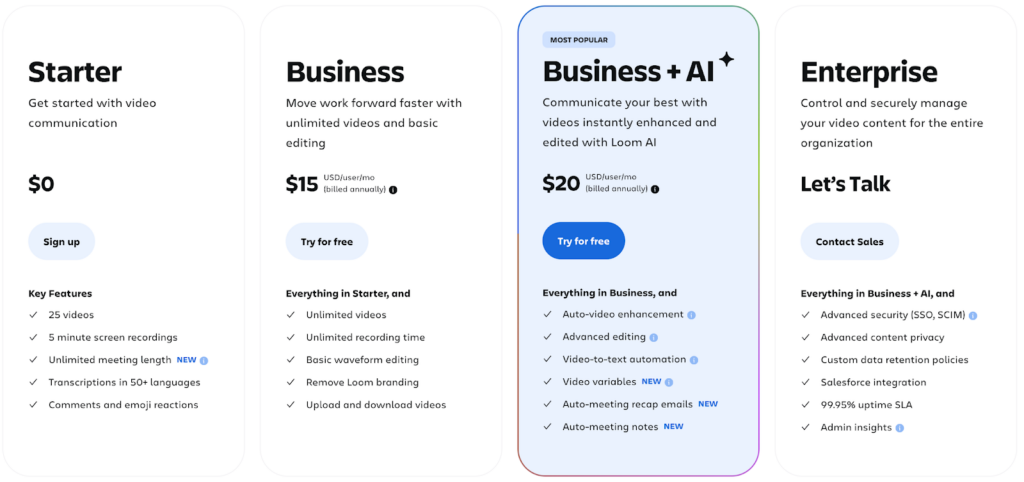
Pricing for Loom
5. Fireflies.ai
Important requirements and decisions are often spoken, not written. Fireflies.ai ensures those moments are captured, searchable, and reusable.
By recording and summarizing meetings automatically, Fireflies reduces the risk of misalignment and missed details.
Who Typically Uses Fireflies.ai?
Fireflies.ai is commonly used by Salesforce Consultants, Business Analysts, Architects, and Admins who spend significant time in discovery calls, stakeholder meetings, and project handoffs.
I use Fireflies.ai for meeting note taking. Claude for a project for each of my clients with access to the Fireflies transcripts through the Fireflies connector. Notion for notes, to-do lists, and using AI to automate updates to documentation. – Keegan McGoldrick | Senior Salesforce Consultant
Key Benefits for Salesforce Work
- Accurate transcripts of discovery and stakeholder calls
- Automatic summaries and action items
- Reduced manual note-taking
- Better continuity between meetings and delivery work
Consultants, Architects, and Business Analysts tend to rely on Fireflies most heavily.
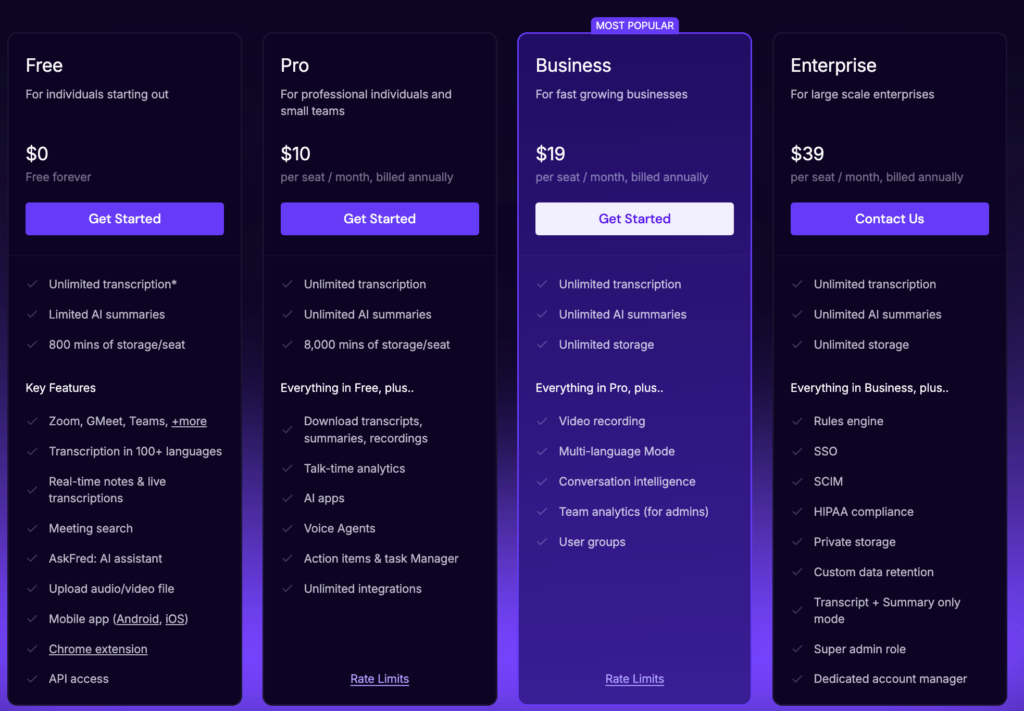
Pricing for Firelfies.ai
6. Claude Code
Claude Code is built for developers who need help navigating and reasoning through complex codebases.
For Salesforce Developers and Technical Architects, it is particularly useful when working with Apex, Lightning Web Components, and integrations where understanding existing logic matters as much as writing new code.
Who Typically Uses Claude Code?
Claude Code is primarily used by Salesforce Developers, Technical Architects, and advanced Consultants who work with programmatic solutions, integrations, and code-heavy workflows.
I use Claude Code to look for a specific class in a repo based on certain process behaviors so I can dig in and troubleshoot support cases from Users. For example I might ask for a batch that’s creating xyz record when this or that happens (fill in the blank). From there I can get more specific about if something worked as expected or not. I used to go to the sandbox, turn on user debug, try and replicate and see if I could find the issue. I still do sometimes it just depends on what’s happening but using Claude Code in VS Code helps me find my answer faster most of the time. – Catherine Hancock | Salesforce Administrator
Where Claude Code Shines
- Searching large repositories based on behavior, not just keywords
- Reasoning through multi-step logic and automation
- Refactoring and reviewing code
- Generating boilerplate and technical documentation
It does not replace hands-on debugging, but it often shortens the path to understanding.
Pricing for Claude Code

AI as a Force Multiplier, Not a Replacement
The most effective Salesforce professionals are not using AI to avoid work. They are using it to remove friction.
This toolkit supports better discovery, clearer communication, faster delivery, and more consistent outcomes. It allows professionals to spend less time reconstructing context and more time designing solutions that scale.
Used intentionally, AI becomes a force multiplier for your skills rather than a distraction.
If you are already using some of these tools, or if you have built a different AI toolkit that works for you, those patterns are worth paying attention to. The ecosystem is evolving quickly, and the professionals who adapt thoughtfully will have a clear advantage.
Explore More Salesforce Career Content
Salesforce For Everyone exists to help professionals start and grow Salesforce careers with clarity and confidence.
You will find videos, podcasts, and articles focused on real-world skills, career progression, and practical guidance.
No hype.
No shortcuts.
Just tools and insights that help you move forward.
Want More Salesforce Career Content?
Watch Salesforce Career focused videos, listen to podcasts and check the menu items above for links to free content and courses.