The LinkedIn Ultimate Guide - Job Seekers & Freelancers
Your Profile Isn’t a Resume. It’s a Landing Page.
Here’s a scenario that plays out constantly in the Salesforce ecosystem.
A recruiter is searching LinkedIn for a Salesforce Admin in their metro area. They run a keyword search, get a list of profiles, and start clicking through. Each profile gets about ten seconds before they decide to keep reading or move on.
In those ten seconds, they’re not reading your work history line by line. They’re scanning. They’re asking themselves: Does this person look legit? Do I understand what they do? Does this feel like someone worth reaching out to? Am I going to look credible to my internal team if I present this candidate to them for an interview?
Most profiles fail that ten-second test, not because the person lacks skills, but because the profile wasn’t built to pass it. It’s like looking at a book cover and reading the description on the back or listening to the first 60 seconds of a song… you quickly make a decision about whether you’re going to spend more time with it. That’s how recruiters and hiring teams use LinkedIn.
The same is true for potential clients vetting a Salesforce consultant, or a hiring manager reviewing candidates before an interview. By the time someone reaches out to you, they’ve already formed an impression based on what your profile communicates at a glance.
That’s why the goal of your LinkedIn profile isn’t to document your career history. It’s to answer five questions as fast as possible:
- Who are you?
- What do you do well?
- Are you credible in your craft?
- Are you involved, engaged and active?
- How can they get in touch with you as easily as possible?
In this article, we’ll walk through every meaningful section of your LinkedIn profile and show you how to optimize each one specifically for the Salesforce ecosystem. Whether you’re trying to land your first entry level role, elevate your career with a new more challenging role, or attract even attract freelance clients as an Independent Salesforce Consultant.
How People Actually Read Your Profile (They Don’t)
Before touching a single section of your profile, understand this: almost nobody reads LinkedIn profiles top to bottom… or even halfway to the bottom.
They scan in a predictable order:
- Profile photo
- Banner image
- Headline
- About section (first two lines, then decide whether to expand)
- Featured section
- Experience
That’s the sequence. And most people make their “keep reading or leave” decision somewhere around step three.
This means the top of your profile carries most of the weight. A weak headline and a banner that doesn’t add to your story can undo a great About and Experience section with stellar Recommendations because nobody ever reaches those sections.
Build your profile with scanners in mind, not end to end readers.
Quick Tip – LinkedIn gives you 2 big images at the top of your profile. Your profile photo and your banner, these are very important. LinkedIn is a very dry social platform in an age of Instagram, TikTok and YouTube Shorts… these 2 images are a core area for you to add some color and life to your profile. Make them count!
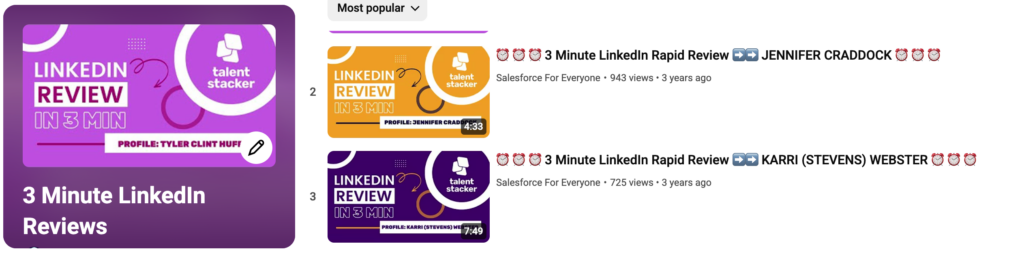
If you learn through by watching/listening try out the playlist below of LinkedIn “Rapid Reviews”. These are reviews of real Salesforce professional LinkedIn profiles giving tips based on the information in this LinkedIn Ultimate Guide!
Your Profile Photo: Don’t Overthink It, Don’t Skip It
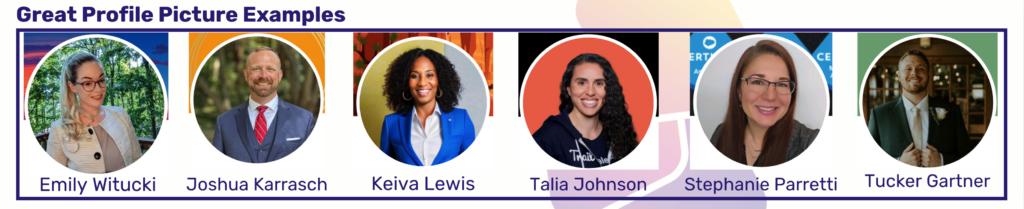
Your photo is the first thing people see. Before your headline, before your certifications, before anything you’ve written they see your face.
You don’t need a professional photoshoot. You need a photo that looks like a person a recruiter or client would want to work with. What does that mean exactly?
What works:
- Approachable expression a natural smile goes a long way – in my opinion this is the most important
- Clear, well-lit, recent
- You’re the only person in it
- Your face takes up most of the frame
- Background is simple and not distracting
What doesn’t:
- Arms crossed, serious/dominant expression
- Sunglasses, group photos, overuse of AI or heavy filters
- Avatar/Character pictures that aren’t you
- Low resolution or dark lighting
The Salesforce community and most hiring teams are friendly and relationship-driven. A warm, approachable photo fits the culture. You don’t need to look like you’re applying to a law firm, but you do need to look like someone worth connecting with that will be easy to talk to.
Think about how awkward it can be to meet someone for the first time, that feeling is true for recruiters and hiring teams also even if it’s part of their job. It’s important that your first profile impression puts them at ease with contacting you.
Your Banner: The Most Underutilized Real Estate on LinkedIn
Default LinkedIn banners are a blue gradient that says nothing about you. Yet most professionals leave it there indefinitely or they replace it with a cityscape or other image that does nothing to support their value as a professional.
Your banner is a billboard. It’s the largest visual elements on your entire profile, and it loads before most people scroll anywhere. If you leave it blank or without purpose, you’re missing a free opportunity to reinforce who you are.
For Salesforce professionals, a strong banner might communicate:
- Your Salesforce specialty (“Salesforce Admin | Flow Automation | Process Optimization”)
- Your Certifications or areas of expertise
- The type of work you do or the problems you solve (“Helping growing businesses get more from their Salesforce investment”)
- Your Talent Stacker or community affiliation if it’s relevant to your positioning
- A clean, professional design that simply looks polished and intentional
You don’t need to be a designer. Tools like Canva have free LinkedIn banner templates you can customize in under 15 minutes. The bar here is low, anything thoughtful beats the default.
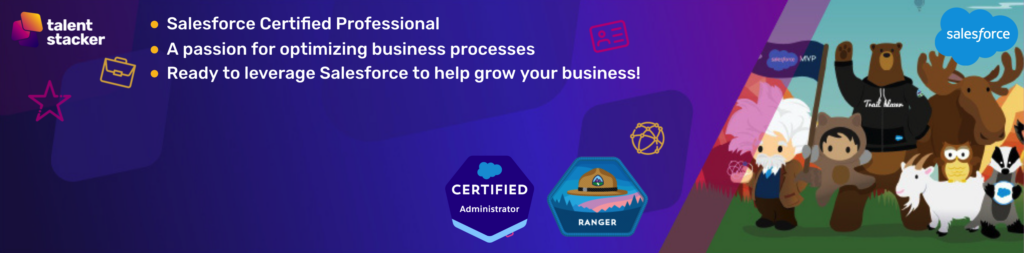
Here is an example of how simple yet elevated a banner can be. Using a tool like Canva you can even grab the image below and edit it to be just the way you want it. Notice how it includes the certification and a quick mention of the value you add.
Your Headline: The Most Important Line on Your Profile
If you only optimize one thing today, make it your headline.
This is what appears beneath your name everywhere on LinkedIn, in search results, in connection requests, in comment sections, in recruiter searches. It follows you everywhere. And most people don’t optimize it.
Here’s what a subpar headline looks like:
“Salesforce Administrator – Open To Work” or “Salesforce Developer 1x Certified“
These describe a job title. They don’t communicate value. They give a recruiter or potential client no reason to click through.
Here’s what a strong headline looks like for different Salesforce career stages:
For someone breaking into Salesforce:
Salesforce Administrator | 2x Salesforce Certified | Non-Profit & Education Background
For an experienced admin:
Salesforce Solution Architect | 5x Salesforce Certified AI & Automations Specialist | Designing orgs that scale
For a consultant or freelancer:
Independent Salesforce Consultant | Helping SMBs implement & optimize Salesforce | 50+ projects delivered
Notice what each of these does:
- Names the role clearly (important for search visibility)
- Includes relevant keywords (certifications, specialties)
- Communicates value or outcome not just the title
A good test: show your headline to someone who doesn’t know you but they are aware of the Salesforce ecosystem. Can they tell in five seconds what you do and who you help? If not, consider how you can change that.
Your About Section: This Is Where You Earn the Click
The About section is where people decide whether they want to reach out to you.
Most people paste in their resume summary, or write something generic like “Passionate Salesforce professional with experience in administration and development.”
Your About section should read like a conversation, not a job posting. Here’s a structure that works well for Salesforce professionals:
Open with who you are and what you do
Don’t bury the lead. Within the first two lines, tell them who you are and the value you bring. This should agree with your Headline and any Banner Image Text you are using.
Share your journey
This is especially important for career changers, and there are a lot of you in the Talent Stacker community. Your path into Salesforce is part of your story and it’s more interesting than you think.
You don’t need to hide the fact that you came from a different industry. In many cases, that background is an asset. A former teacher who became a Salesforce Admin brings communication and training skills that pure tech backgrounds often lack. A former operations manager understands business process in ways that matter on implementation projects.
Tell the honest version of your story. People connect with it.
Highlight what you’re good at
Not a bulleted list of certifications, those go elsewhere. This is about the specific problems you solve and the work you’re known for. Flow automation. Data migrations. Salesforce implementations for nonprofits. Whatever your zone of expertise is, name it specifically.
Here’s an example “About” you can steal and rewrite for yourself
I am a Salesforce Certified Professional who has hands-on experience with the Salesforce Platform. I am actively engaged in multiple Salesforce communities and groups to increase my Salesforce knowledge, awareness and professional connections. Highlights from my Salesforce experience include {List Experience from Volunteer Projects, scenario based projects etc.}.
In my free time I enjoy participating in Salesforce Community groups both learning and helping others to leverage Salesforce to improve productivity and efficiency for their employers and co-workers! I am also a member of a Salesforce Professional Development Program to fully understand the Salesforce Ecosystem and network to build valuable relationships in the Salesforce space.
Outside of my passion for Salesforce I enjoy {List some personal hobbies and interests like family/travel}.
Your Experience Section: Results, Not Responsibilities
This is where most LinkedIn profiles collapse into a copy-paste of job descriptions nobody reads.
Responsibilities tell people what your job required. Results tell people what you’re actually capable of.
Here’s the difference:
Weak:
Responsible for Salesforce administration, user management, and report creation.
Strong:
Administered Salesforce for a 200-person sales organization, managed user access and permissions, built custom reports and dashboards that reduced weekly reporting time by 4 hours, and automated 3 manual approval processes using Flow.
The second version gives context, specificity, and outcomes. It tells a recruiter or client exactly what working with you produces.
For career changers who are earlier in their Salesforce journey: include relevant projects, trailhead work, and any hands-on experience you’ve built even if it wasn’t in a formal Salesforce job title. A Salesforce org you built for a nonprofit, a sandbox project you completed during training, a real-world scenario you worked through, these count, and they’re worth including.
Use Problem > Solution > Outcome Language
You have to keep this tight. State the problem your project was needed to fix. State the solution that was determined to fix that problem. State the outcome of the implemented solution.
Problem: The business had inbound leads coming from all directions with no clear way to prioritize who to contact.
Solution: An automated Flow process to assign leads to reps based on custom lead scoring and “rep fit” logic to assign leads to the reps with a proven history of closing leads meeting specific criteria.
Outcome: Initial Lead Contact time was cut by 40% and conversion rates increased by 17% in just 60 days. Lead/customer satisfaction increased, sales rep satisfaction increased and revenue increased.
Your Featured Section: Show Your Work
The Featured section sits near the top of your profile and functions as a portfolio. Most people leave it empty.
For Salesforce professionals, this is valuable space. Use it to showcase:
- Salesforce certifications (screenshot or badge)
- A case study or project summary you’ve written
- An Article, Video or LinkedIn post that highlights your value well
- A resource you’ve created that demonstrates your knowledge
Every item in your Featured section is evidence. It supports the claims you’re making in your headline and About section. A profile that says “I’m a Salesforce automation expert” is more believable when the Featured section includes a detailed walkthrough of a Flow you built.
Recommendations: The Credibility Layer
This is one of the most underused credibility tools on LinkedIn, and it matters more than most people realize.
A generic recommendation (“Great to work with, highly recommend!”) adds little. A specific recommendation that describes a real situation and a real outcome is powerful social proof.
Reach out to managers, clients, coworkers, fellow community members and mentors… especially people who can speak to your Salesforce skills specifically. Ask them to describe a specific project or situation rather than just writing something general. I would actually recommend writing the recommendation for them and just send it over to them to help get them started. This will massively boost the number of people who come through for you. Just make it easy for them.
If you’re early in your Salesforce career, a recommendation from an instructor, mentor, community group leader you’ve gotten to know well, or a peer who worked alongside you on a certification study group still counts.
Make It Coherent, Not Just Complete
The biggest invisible problem on most LinkedIn profiles isn’t that sections are missing, it’s that the sections don’t tell the same story.
The photo looks corporate. The banner is blank. The headline says “Salesforce Admin.” The About section reads like a resume. The Featured section has a five-year-old article from a previous career.
Each piece, in isolation, is fine. Together, they create confusion about who this person actually is and what they’re trying to do next.
The question that should guide every section of your profile is: What do I want to be known for?
If you’re positioning yourself as a Salesforce consultant who helps small businesses get their CRM right, that should be visible in your headline, reinforced in your About section, evidenced in your Featured section, and backed up by your experience. Everything should point in the same direction.
Cohesion builds trust faster than any individual section can on its own.
Don’t Wait for Perfect
The most common LinkedIn profile mistake isn’t having a bad profile. It’s spending months tweaking the profile while staying invisible on the platform.
A solid profile that exists today is better than a perfect profile that exists in six months.
Get the foundation right. Photo, banner, headline, About section and then start showing up. Your profile will evolve as your career evolves. The goal right now is to be findable, credible, active, engaged and clear about what you bring to the table.
Profile Audit Checklist
Before moving to Part 3, run through this quickly:
Photo — Professional, clear, approachable, recent?
Banner — Does it communicate your Salesforce specialty or value proposition?
Headline — Does it go beyond your job title and communicate value? Does it include relevant keywords?
About Section — Does it tell your story? Does it speak to the problems you solve? Does it have a call to action?
Experience — Does it highlight results and outcomes, not just responsibilities?
Featured Section — Does it show evidence of your expertise?
Recommendations — Do you have at least one or two specific, relevant recommendations?
If several of these are “no,” you’ve just found your weekend project.
Key Takeaways
Your LinkedIn profile is the first thing recruiters, hiring managers, and potential clients see before they ever speak to you. It needs to work on its own.
Think of it as a landing page, not a resume. Every section should answer the question: Why should someone in the Salesforce ecosystem want to connect with, hire, or work with me?
Optimize for scanners. Lead with value. Tell your real story. Show evidence. Make it easy for the right person to take the next step.
And then… which is where Part 3 comes in… start showing up.
What’s Next
A strong profile gives you credibility. But credibility alone doesn’t generate opportunities.
In Part 3, we’ll tackle the question most Salesforce professionals wrestle with when they start taking LinkedIn seriously: What should I actually post, how often, and what can I realistically expect from it?